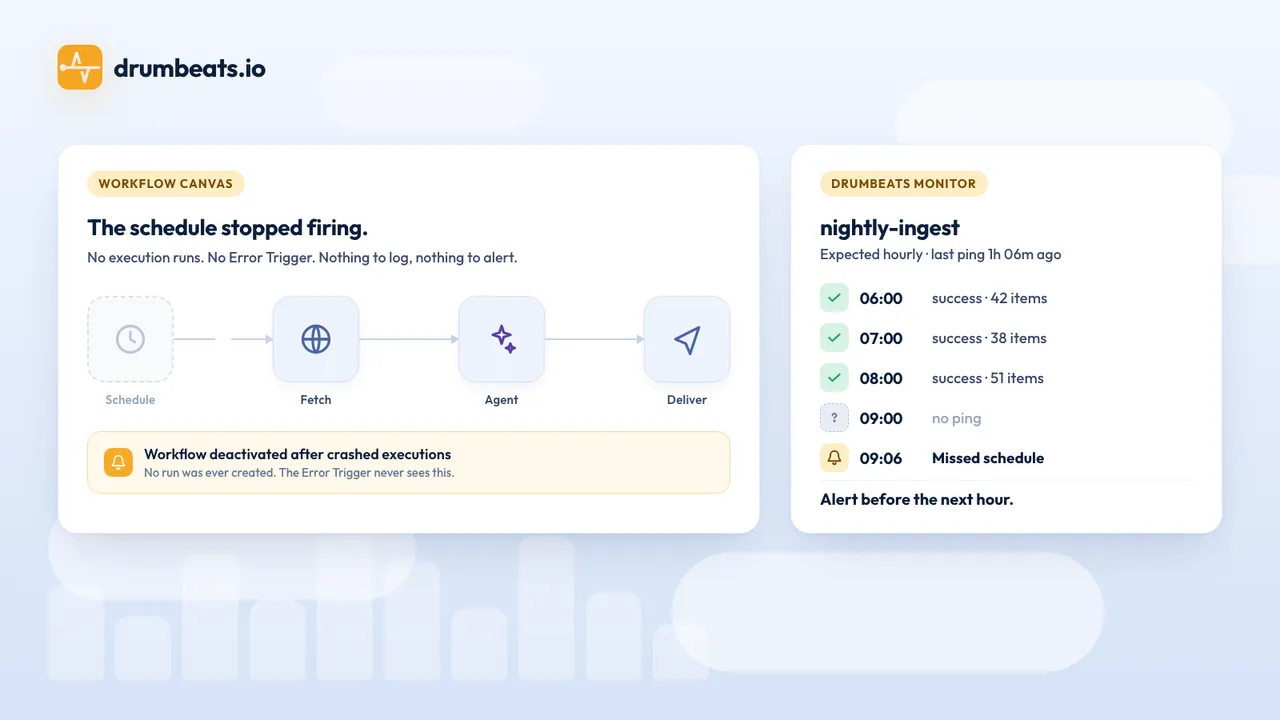
The short answer: n8n's Error Trigger fires when a workflow runs and throws. The failures that cost you days create no execution at all: a schedule that stopped, a draft nobody published, a webhook that answers 404, an execution that crashed, a green run that processed nothing, an agent that answered with nothing. You need a watcher outside n8n that expects a signal and pages you when the signal stops.
Your lead sync runs every 15 minutes. On Tuesday at 14:02 it runs for the last time. The scheduler stalls, or someone edited the workflow and forgot to publish, or the instance restarted and the trigger did not come back. No node throws. The execution list has no new rows, and you do not look at the execution list. You find out on Friday, from the client.
The second version looks healthier and costs more. The workflow keeps running, every node stays green, and zero records land. A 35-reply thread in the n8n community opened with that sentence in August 2026, and the replies describe runs that stayed green for eleven days while writing nothing.
This guide builds the fix in four levels and asks one question at each: with this in place, by when would you have known about Tuesday? We built and drilled every level on a self-hosted n8n 2.44.6 instance on 23 October 2026, so the screenshots and timings below come from real runs. If you know the cron version of this problem, why your cron job failed silently is the same story one layer down.
What n8n gives you, and where it goes blind#
n8n ships real monitoring. All of it lives inside the thing you are monitoring, and the useful parts are gated by plan.
| Feature | Tells you | Available on |
|---|---|---|
| Error Trigger / error workflow | A production execution threw, with node, message and execution URL | All plans |
| Insights | Production executions, failures, failure rate, average run time | Summary everywhere; the dashboard needs Cloud Pro or self-hosted Business |
| Log streaming | workflow.started, success and failed events to syslog, a webhook or Sentry | Enterprise |
/healthz | The process answers. The docs add: "doesn't indicate DB status" | Always on |
/healthz/readiness | The database is connected and migrated | Always on |
/metrics | Prometheus counters per process, none per workflow | Self-hosted, off by default |
The scheduler got better in 2026 too. Version 2.36 added a missed-execution grace period to the Schedule Trigger, and 2.45.0 on 20 October made the durable scheduler the default. The default policy still skips missed executions, and no setting pages you when that happens.
The Error Trigger docs draw its boundary in one sentence: it "only runs when an automatic workflow errors". Read that against the ways a workflow goes quiet, as reported in the community forum and the GitHub tracker during 2025 and 2026:
- The Schedule Trigger stops firing. Cloud tenants and Kubernetes queue-mode setups both report it. No execution exists, so nothing throws.
- The workflow is unpublished. n8n 2.0 replaced the Active toggle with Publish. An unpublished draft runs on demand and never on schedule.
- n8n deactivated it for you. The message reads "automatically deactivated due to multiple crashed executions". The error workflow did not run.
- The production webhook answers 404. The workflow shows as active. The caller sees the error and you do not.
- The execution crashed. A Redis drop or a restart leaves executions marked crashed with no error data saved.
- The run was green and did nothing. Zero items, an IF branch that ends in silence, a 200 response with a failure in the body.
- The agent swallowed a tool error. n8n treats tool errors as part of the agent's reasoning, so the run succeeds.
Self-hosters add an eighth. One VPS froze for eight hours and the Error Trigger froze with it. Thread numbers for all of these sit in the references at the end.
On Tuesday, the Error Trigger would have told you nothing, because nothing ran.
The n8n dead man's switch in 60 seconds#
Turn the direction of monitoring around. The workflow reports that it finished, and a service outside n8n alerts when that report fails to arrive on time. A missing report covers the first five failures above, because they all produce silence, and the watcher keeps working when n8n itself is down.
Drumbeats offers four monitor types for this. A Cron monitor expects a ping on a cron schedule. A Heartbeat monitor expects one every interval. An Event-driven monitor has no schedule and tracks each run from start to finish. An Uptime monitor polls a URL from outside.
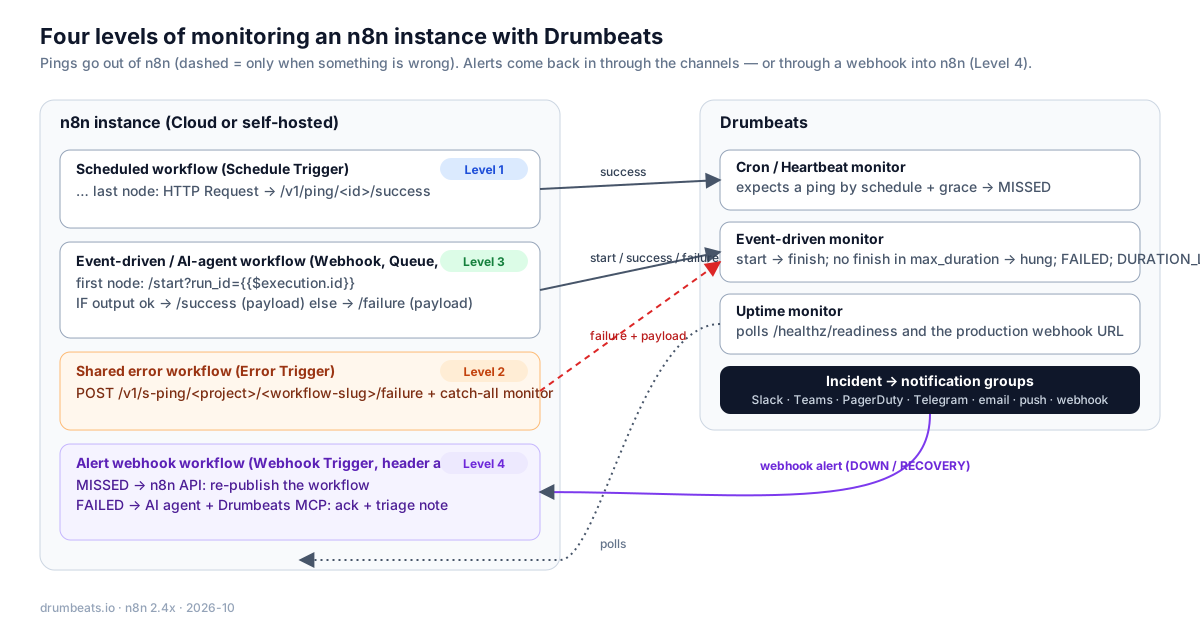
Level 1 alone would have caught Tuesday.
Level 1: one node at the end of the workflow#
Add one HTTP Request node as the last step of the lead sync:
Method:   GET
URL:      https://api.drumbeats.io/v1/ping/{{ $('Drumbeats config').item.json.monitorId }}/success
Options:  Timeout 5000 ms
Settings: Retry On Fail (3 tries), On Error: Continue
Method: GET
URL: https://api.drumbeats.io/v1/ping/{{ $('Drumbeats config').item.json.monitorId }}/success
Options: Timeout 5000 ms
Settings: Retry On Fail (3 tries), On Error: ContinueA Set node at the top of the workflow holds the monitor ID, so the URL is one expression you paste once. The ping node retries and then continues, because a monitoring hiccup must never fail the job it watches.
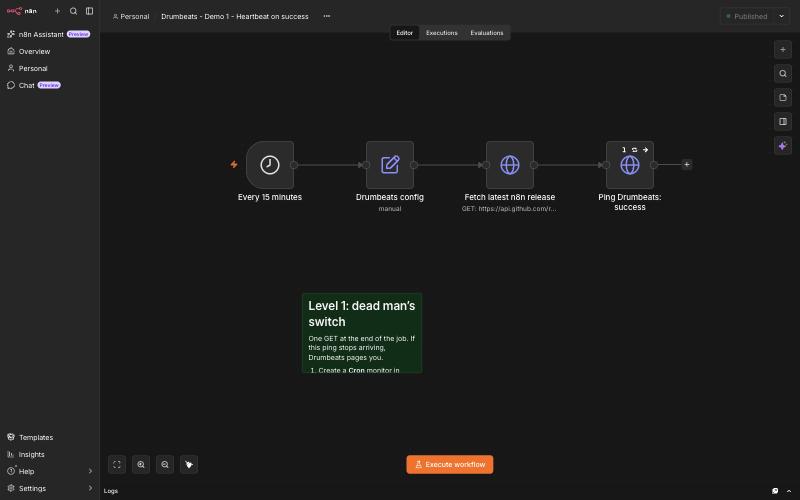
Now create the matching monitor in Drumbeats. Pick the type from the Schedule Trigger mode:
| Schedule Trigger mode | Drumbeats monitor | Schedule to enter |
|---|---|---|
| Cron expression | Cron | The same expression and timezone. Drop the seconds field if n8n has six. |
| Interval, "every 15 minutes" | Heartbeat | 15m |
| Polling trigger that often finds nothing | Heartbeat on the poll cadence | Ping on every poll, even an empty one, and put the item count in the payload |
One setting deserves thought: grace_period_seconds, how long Drumbeats waits past the expected time before declaring the run MISSED. Set it above your worst-case run time plus scheduler jitter. The default of 300 seconds fits cadences of 15 minutes and up. A grace period that is too short is the usual source of false alerts.
Back to Tuesday. The 14:15 run does not happen. At 14:20 the grace period ends, Drumbeats opens a MISSED incident, and your phone buzzes. You lost 18 minutes instead of three days.
In our drill we unpublished Demo 1 at 13:49 UTC. Its 14:00 run never happened, and at 14:05:00 Drumbeats opened the incident. We will come back to what happened five seconds later.
Level 1 tells you the job went quiet. It cannot tell you why: a thrown error shows up as the same MISSED incident, after the same grace period, with no message attached. That is the job of Level 2.
Level 2: one error workflow for every workflow#
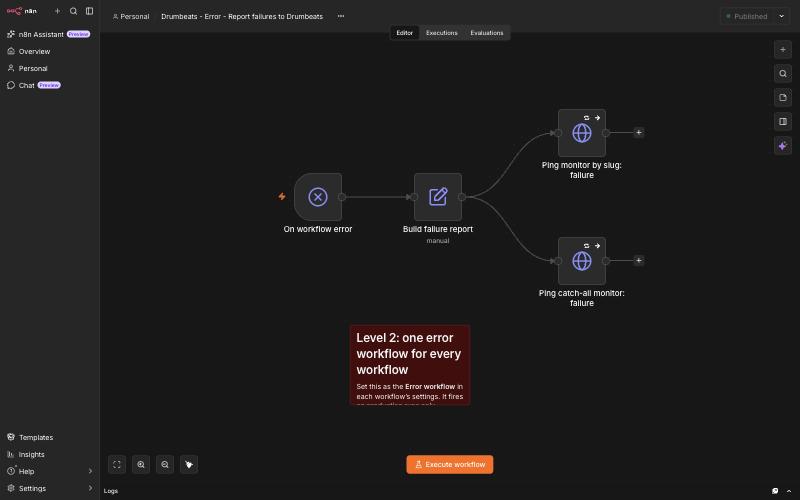
n8n lets any workflow name an error workflow in its settings, and one error workflow can serve all of them. The Error Trigger hands it this:
{
  "execution": {
    "id": "33678",
    "url": "<link to the saved execution>",
    "lastNodeExecuted": "Fail on purpose",
    "mode": "webhook",
    "error": { "message": "...", "stack": "..." }
  },
  "workflow": { "id": "...", "name": "Drumbeats - Demo 3 - Event-driven run tracking" }
}
{
"execution": {
"id": "33678",
"url": "<link to the saved execution>",
"lastNodeExecuted": "Fail on purpose",
"mode": "webhook",
"error": { "message": "...", "stack": "..." }
},
"workflow": { "id": "...", "name": "Drumbeats - Demo 3 - Event-driven run tracking" }
}Our shared error workflow turns that into Drumbeats pings in three nodes, without touching the workflow that failed:
- Build failure report. A Set node derives a slug from the workflow name, so
Drumbeats - Demo 1 - Heartbeat on successbecomesdrumbeats-demo-1-heartbeat-on-success, and takesexecution.idas the run ID. - Ping monitor by slug. A
failureping to/v1/s-ping/<project-id>/<slug>/failure. The slug endpoint addresses a monitor by project and slug, so you never copy a UUID into a workflow. This monitor is the one that pages people. - Ping the catch-all monitor. The full report, with workflow, failed node, error message, execution URL and mode, goes to one Event-driven monitor called "n8n failures". If Drumbeats answered the slug ping with 404, no monitor exists for that workflow, and this ping is a
failureso someone still gets paged. Otherwise it is alogping, which changes no status and leaves one searchable timeline of every failure on the instance.
Three caveats come straight from the n8n docs. The error workflow fires for production runs, so the editor's run button cannot test it. execution.url stays empty when "Save failed production executions" is off. Errors thrown by the trigger node itself arrive in a different shape, with a trigger object instead of a full execution, so give those a fallback run ID.
One more, from our own drill. On 23 October the slug endpoint recorded the failure and closed the right run but stored no POST body, while the identical request to the ID endpoint kept its payload. We fixed that in Drumbeats on 24 October and it ships with the next release. The catch-all ping by ID stays in the design on purpose, because it is the audit log and the fallback pager.
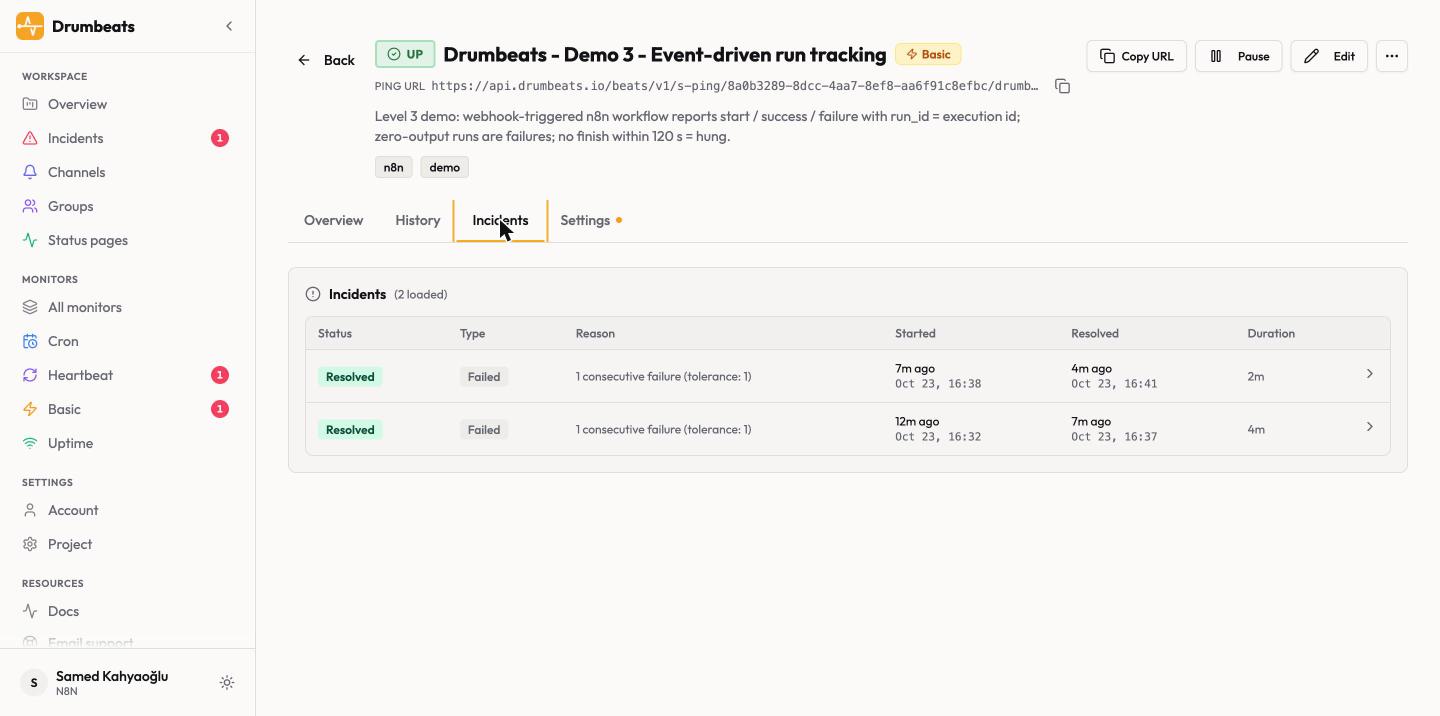
Tuesday with Levels 1 and 2: if the sync had thrown instead of going quiet, the page would have arrived within seconds and named the node and the error. Most teams can stop here. One node per workflow, one setting per workflow, one shared error workflow.
Level 3: start, success and failure with a run ID#
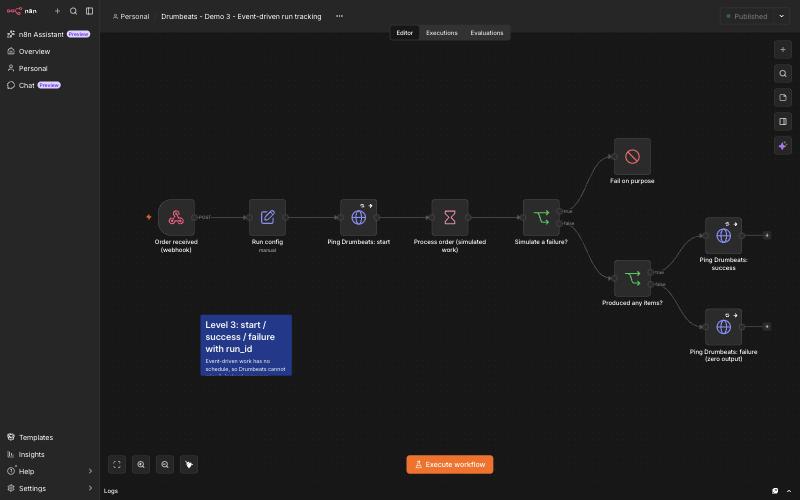
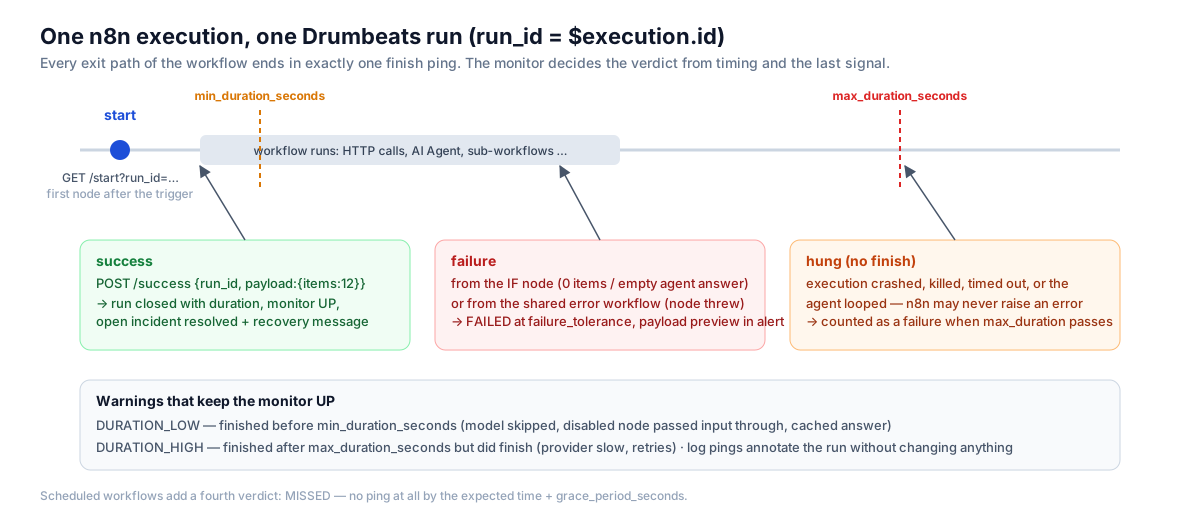
Webhook, form, chat and queue-triggered workflows have no schedule. Silence is normal for them, and a heartbeat would page you on every quiet night. Give these an Event-driven monitor and report each run from both ends, keyed by n8n's own execution ID:
After the trigger:   GET  /v1/ping/<monitor-id>/start?run_id={{ $execution.id }}
Every success path:  POST /v1/ping/<monitor-id>/success  {"run_id": "...", "payload": {"items_processed": 12}}
Every failure path:  POST /v1/ping/<monitor-id>/failure  {"run_id": "...", "payload": {"reason": "..."}}
After the trigger: GET /v1/ping/<monitor-id>/start?run_id={{ $execution.id }}
Every success path: POST /v1/ping/<monitor-id>/success {"run_id": "...", "payload": {"items_processed": 12}}
Every failure path: POST /v1/ping/<monitor-id>/failure {"run_id": "...", "payload": {"reason": "..."}}The Error Trigger payload carries the same execution ID, so a failure reported by the Level 2 workflow lands on the run that this start opened.
Two monitor settings do the work from here. max_duration_seconds, 120 in the demo, turns a run that started and never finished into a hung run, and a hung run counts as a failure. That is the crashed, killed or Redis-dropped execution n8n never reports. min_duration_seconds flags runs that finish too fast to have done the work.
The green-but-empty run needs one IF node, "Produced any items?", on the success path. If the count is zero, send failure with the count in the payload instead of success. Drumbeats has no expected-item-count rule on the monitor, so this check belongs in the workflow.
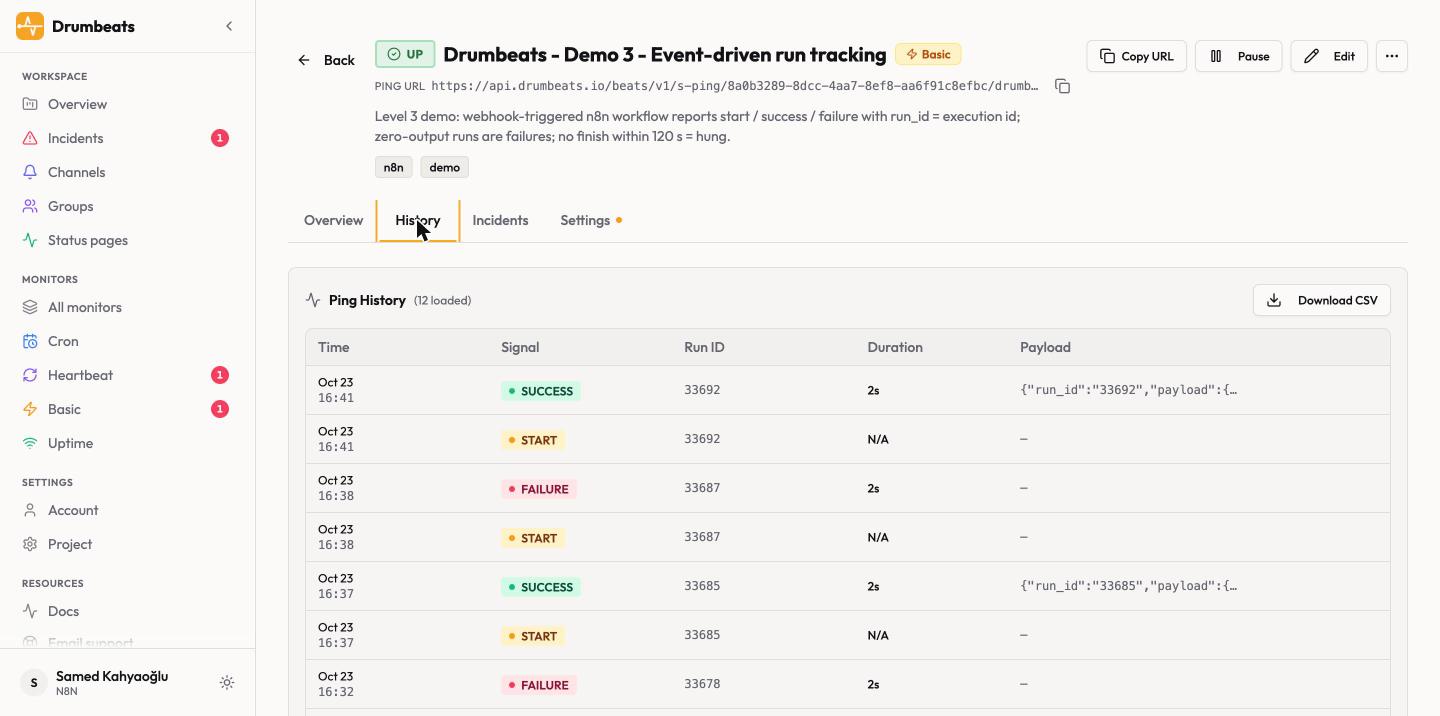
We sent three requests to the published demo and watched both sides:
| Request body | n8n says | Drumbeats recorded |
|---|---|---|
{"items": 5} | Success | Start, then success after 2,147 ms, payload kept |
{"items": 0} | Success, all nodes green | Start, then failure: zero output, FAILED incident opened |
{"fail": true} | Error, error workflow fired | Start, then failure through the slug ping, full error on the catch-all monitor |
The middle row is the whole reason for Level 3. The same run reads as success in n8n and as an incident in Drumbeats. The next successful request resolved that incident on its own, four minutes later.
Queue consumers follow the same pattern; see background job monitoring and queue worker monitoring for those.
AI agents are still jobs#
An AI Agent node calls a model, maybe calls tools, and returns text. Wrap it like any other job: start before the model runs, success or failure after.
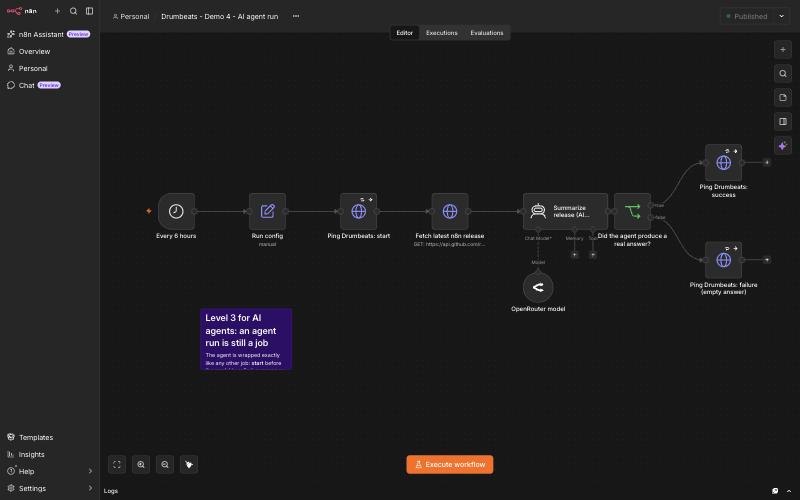
Agents fail in their own way. n8n folds tool errors into the agent's reasoning, so the run stays green. An open issue describes tool observations that come back empty and an agent that "invents plausible values". A loop shows up as nothing but time and token spend.
We watched the inventing happen. In Level 4 below, a triage agent runs with Drumbeats tools attached. During one drill the tool was disabled, and the agent wrote "Fetching recent history and failure payload... Acknowledging incident..." and then blamed "a timeout error connecting to the event source". It fetched nothing, acknowledged nothing, and the real cause was a Stop and Error node we had placed on purpose. Nothing in n8n flagged the run.
So the checks for an agent sit on the output and on the clock:
| Check | Where | Catches |
|---|---|---|
| Answer of at least 40 characters, or structured output that parses | IF node after the agent, failure ping with the output | Empty, refused or truncated answers that n8n marks green |
min_duration_seconds: 2 | Monitor | The model was skipped, or a disabled node passed its input through |
max_duration_seconds: 300 | Monitor | Loops, max-iteration stalls, a provider that hangs |
Release, summary and model name in the success payload | Success ping | A per-run record of what the agent said |
maxIterations: 5, model timeout 60 s, 1 retry | Agent and model options | Bounds the cost; hard failures reach the Level 2 error workflow |
The demo agent's run took 2,093 ms and the success ping stored the release tag, the two-sentence summary and the model name.
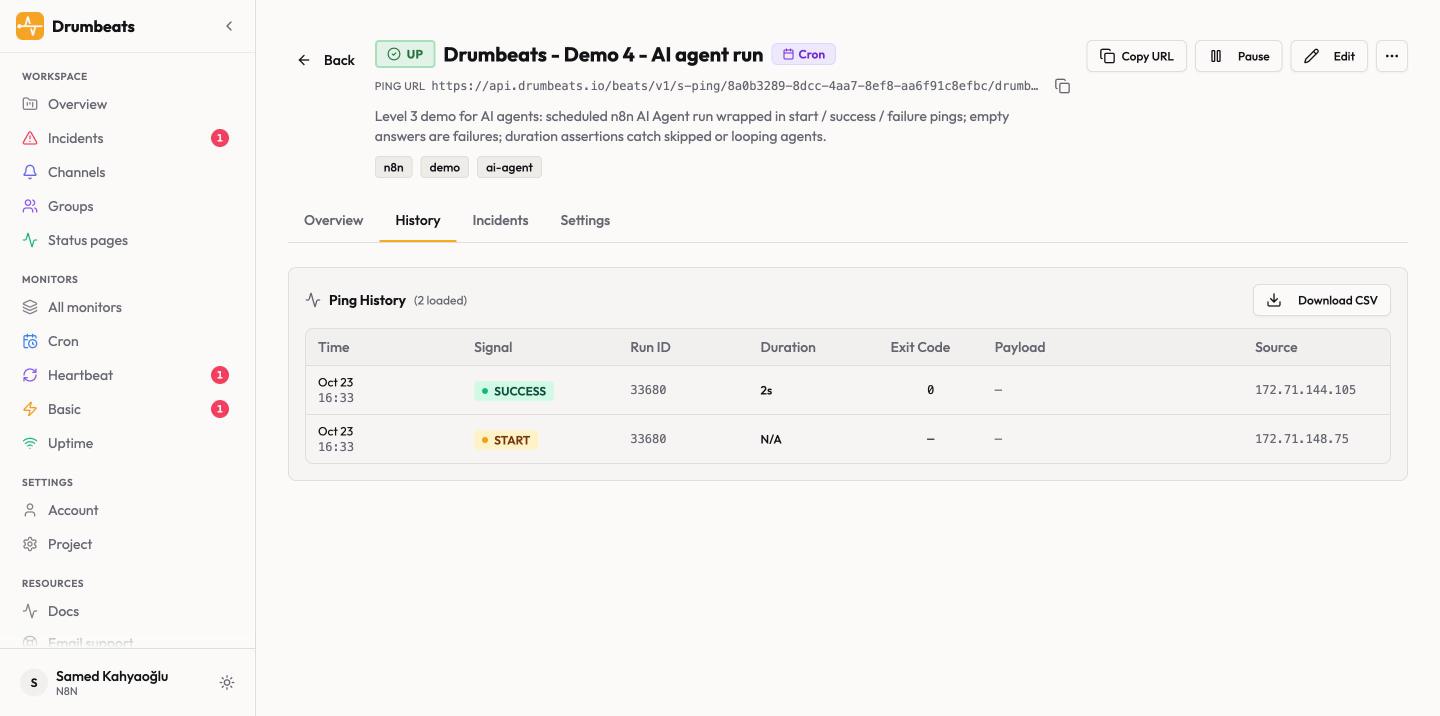
Token spend stays out of scope here; a tracing tool such as Langfuse does that job. You can create these monitors by conversation from Claude or Cursor through the Drumbeats MCP server; the AI agent integration guide shows the setup.
Level 4: let Drumbeats page n8n back#
Most alerts end with a person doing the same thing: open n8n, find the workflow, publish it again. Drumbeats can send every alert to a webhook channel, and that webhook can be an n8n workflow that does the publishing.
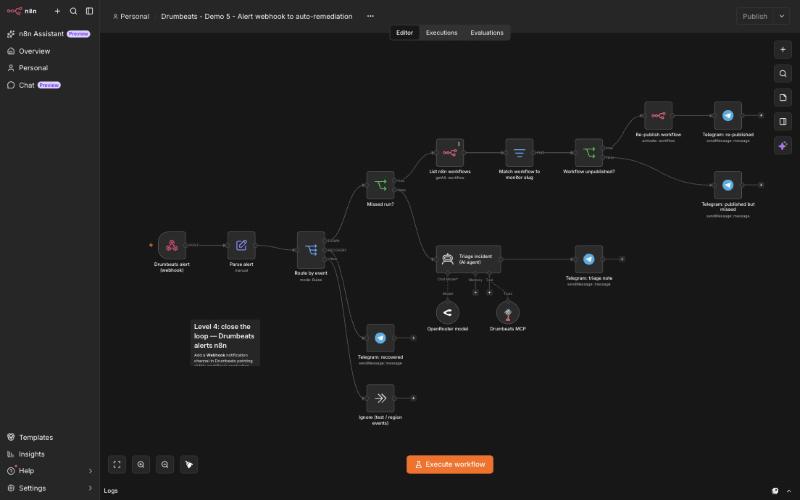
The alert body carries event (DOWN or RECOVERY), incident.event (MISSED, FAILED, DURATION_HIGH or DURATION_LOW), incidentId and monitor.slug. Demo 5 routes on those:
- MISSED. List workflows through the n8n API, match the monitor slug to a workflow name, and if that workflow is unpublished, publish it. If it is already published, send a message with the likely causes instead.
- Any other DOWN. An AI agent with the Drumbeats MCP tools reads the monitor's history and the failure payload, acknowledges the incident and posts a three-line triage note.
- RECOVERY. Confirm in the team chat.
Now finish the drill from Level 1. Drumbeats opened the MISSED incident on Demo 1 at 14:05:00. The webhook reached n8n at 14:05:05. Demo 5 listed the workflows, found Demo 1 unpublished, published it through the n8n API and posted "Auto-remediation" to Telegram, all before 14:05:06. Demo 1's next run at 14:15 sent its success ping and resolved the incident. Nobody opened n8n.
Two guards. Drumbeats does not sign webhook payloads, so put header auth on the n8n Webhook trigger and set the same header on the Drumbeats channel. And publish at most once per incidentId, or a workflow that crashes on start will loop.
Self-hosted extras: watch the instance and the webhook URL#
Two Uptime monitors cover the cases no workflow can report:
- The instance. Poll
/healthz/readinessevery 60 seconds and expectok. Plain/healthzsays the process answers; readiness says the database is connected. A Kubernetes operator noted in the forum that a liveness probe cannot see a wedged scheduler either, so this monitor sits beside Level 1 rather than replacing it. - A production webhook. Poll its URL with GET. On n8n 2.44.6 a published POST-only webhook answers 404 with "This webhook is not registered for GET requests. Did you mean to make a POST request?", and an unregistered one answers 404 with "The requested webhook ... is not registered." Expect 404 and require the "Did you mean to make a POST request" text. The check fails the moment the webhook drops off.
Confirm those response texts on your own n8n version before you rely on them.
Alert routing without 3 a.m. noise#
Four alert logic settings keep this useful instead of loud.
Tolerances. schedule_tolerance and failure_tolerance set how many consecutive misses or failures it takes to go DOWN. One suits most jobs. Two or three suit a flaky upstream API.
Surge protection. After 10 consecutive alerts, Drumbeats pauses paging for an hour while incidents keep updating, so the catch-all monitor cannot flood a channel during an outage.
Groups per client. Route each client's monitors to their own Slack channel, Teams, Telegram, email or PagerDuty, and give each client a status page if you run an agency.
Automatic recovery. The next success resolves the incident and reports the outage duration, so nobody closes tickets by hand.
Cloud vs self-hosted, and vs Healthchecks.io or Cronitor#
| n8n Cloud | Self-hosted n8n | |
|---|---|---|
| Levels 1 to 3 | Yes, with the HTTP Request node | Yes |
| Level 4 auto-remediation | Yes, with an n8n API key | Yes |
| Instance and webhook uptime | Webhook URL only, n8n runs the instance | Both |
| Native alternatives | Insights dashboard on Pro and above | /metrics, log streaming on Enterprise |
Healthchecks.io is the tool the 2026 forum threads recommend most. Its free tier covers 20 checks and its Business plan costs $20 for 100; community n8n nodes exist and it supports start and fail pings. Cronitor's free tier covers 5 monitors, and paid monitors cost $2 each plus $5 per user. Either one handles Level 1. Drumbeats adds run correlation by run ID, duration assertions, the payload in the alert and the webhook back into n8n. The best cron job monitoring tools in 2026 compares the wider field.
Test the pager#
Run three drills after setup, and read both sides each time:
# Success: expect a closed run with a payload
curl -X POST https://<your-n8n>/webhook/drumbeats/demo-order -H "Content-Type: application/json" -d '{"items": 5}'
# Green but empty: expect a FAILED incident although n8n says success
curl -X POST https://<your-n8n>/webhook/drumbeats/demo-order -H "Content-Type: application/json" -d '{"items": 0}'
# Thrown error: expect the error workflow to report the failed node and message
curl -X POST https://<your-n8n>/webhook/drumbeats/demo-order -H "Content-Type: application/json" -d '{"fail": true}'
# Success: expect a closed run with a payload
curl -X POST https://<your-n8n>/webhook/drumbeats/demo-order -H "Content-Type: application/json" -d '{"items": 5}'
# Green but empty: expect a FAILED incident although n8n says success
curl -X POST https://<your-n8n>/webhook/drumbeats/demo-order -H "Content-Type: application/json" -d '{"items": 0}'
# Thrown error: expect the error workflow to report the failed node and message
curl -X POST https://<your-n8n>/webhook/drumbeats/demo-order -H "Content-Type: application/json" -d '{"fail": true}'Once a month, unpublish one scheduled workflow on purpose and wait for the MISSED alert. If Level 4 is in place, watch it publish the workflow back.
Get started#
You need a Drumbeats project, one monitor per workflow you care about, and the nodes above. The free plan includes 200,000 beats a month and each ping costs one beat; Pro raises the payload limit for larger agent outputs. Start with Level 1 on the scheduled workflow you would miss first, then add the shared error workflow. Prefer to create the monitors by conversation? Connect Drumbeats to your AI assistant.
Frequently asked questions#
How is this different from n8n's Error Trigger? The Error Trigger reacts to an execution that threw. A heartbeat reacts to a signal that did not arrive, which covers runs that never started or never finished.
Why doesn't my Error Trigger fire? Manual runs do not trigger it, a failure before an execution exists cannot reach it, and crashed executions save no error data.
Why does my Schedule Trigger stop firing? The reported causes are scheduler stalls, drafts left unpublished after the 2.0 Publish change, auto-deactivation after crashes, and imported triggers with missing fields.
Does this work on n8n Cloud? Yes. It needs the HTTP Request node and the Error Trigger, both available on Cloud.
Do I need an SDK or a custom node? No. Each ping is one HTTP request.
Can Drumbeats detect a workflow that ran but did nothing? Yes, with one IF node that sends a failure ping when the item count is zero.
How do I monitor an n8n AI agent? Start and finish pings around the agent, an output check, and minimum and maximum durations on the monitor.
References#
- n8n docs. Error Trigger node and Error handling
- n8n docs. Insights, Log streaming, Monitor n8n
- n8n docs. Durable scheduler and release notes (2.36, 2.45)
- n8n community. How do you catch workflows that run fine but do nothing? (308708), The silent failure: when your workflow succeeds but does nothing (307116), Schedule Trigger silently stops firing (303072), Error workflow upon AI agent tool failure (252743)
- n8n community. Production webhooks 404 not registered (306925), Auto-deactivated after crashed executions (241318), Redis disconnect leaves executions running (298882), n8n crashed silently (264666)
- n8n on GitHub. Issue #31326 (schedule stopped on Cloud), Issue #38870 (empty tool observations)
- Drumbeats docs. Monitor types, Event-driven pings, Payloads, Webhooks
- Pricing pages. Healthchecks.io, Cronitor
Keep following Drumbeats
Prefer a feed reader or want to share this post with your team? The archive stays on permanent Drumbeats URLs and every article is available through standard feeds.
Related reading
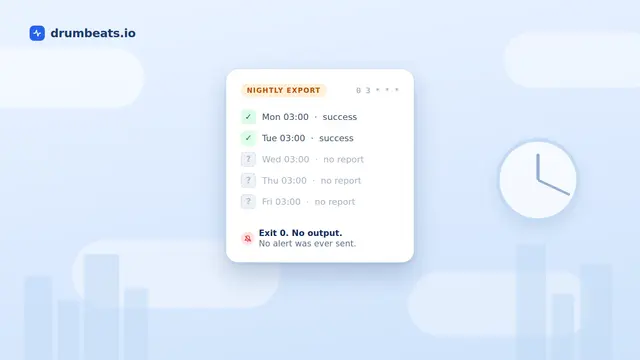
Why Your Cron Job Failed Silently (and How to Actually Catch It)
Cron does not read your exit code, does not retry, and does not warn you when it does not run. It mails output only if a mail transfer agent happens to exist on the host. This is a sourced walkthrough of the ten ways a cron job fails without a trace, why Kubernetes CronJobs fixed the scheduling problems but not the reporting one, and the one mechanism that answers whether it succeeded.
How to Build an MCP Server for Your SaaS: What Shipping Ours Taught Me
The stdio server took one day to code. Everything that made it good took three weeks. A development story about API prep, tool design, OAuth surprises, and why agents read schemas, not READMEs.

Background Job Monitoring vs APM: What Most Teams Actually Need
Teams searching for APM tools to monitor background jobs and async workers are usually shopping in the wrong category. APM traces why code is slow; job monitoring confirms your crons, queues, and workers ran at all. We compare the two honestly: what Datadog, New Relic, and Sentry are genuinely great at, what a heartbeat monitor does instead, and the real June 2026 cost math for a 50-job workload on each path.