Cron jobs are the quietest part of your infrastructure. They run at 2 AM, they finish before anyone is awake, and when they don't run, nothing in your dashboards changes color. The bill goes uncollected. The backup is missing. The data export is a day stale. By the time a human notices, it's already a customer support ticket.
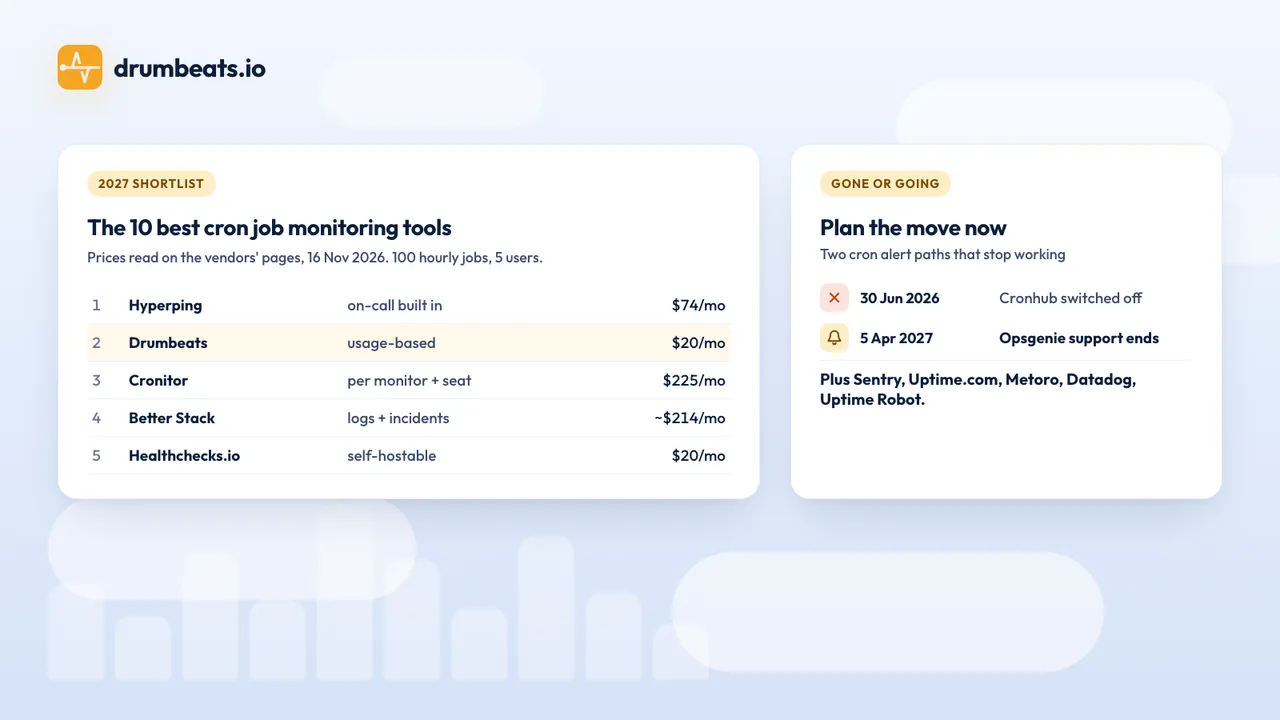
A good monitoring tool turns that silence into a signal. This guide walks through the ten cron job monitoring tools worth shortlisting in 2027: what each one does well, what it costs, and which kind of team should pick which. Prices were read on the vendors' own pages on 16 November 2026.
We've kept it factual. Where a tool is better than the alternatives, we say so. Where Drumbeats (the tool we build) is the wrong fit, we say that too.
What changed in 2026#
Two tools left the market this year, and three shifts make this list look different from last year.
Cronhub shut down, and Opsgenie is ending. Cronhub stopped taking payments on 31 May 2026 and switched off on 30 June 2026, deleting all monitors and ping history (dates as reported by several migration guides; cronhub.io no longer loads). Atlassian stopped selling Opsgenie on 4 June 2025 and ends support on 5 April 2027, when access stops and unmigrated data is deleted (Atlassian). If your cron alerts route through Opsgenie heartbeats or an Opsgenie integration, that path stops working in April.
Background work is no longer "just cron". Most teams now run a mix: a few classic crons in crontab, a Kubernetes CronJob or two, queue workers in Sidekiq / Celery / BullMQ, webhook handlers, and one-off scripts triggered from CI. A monitoring tool that only handles cron schedules covers a shrinking percentage of the actual scheduled work in production.
Pricing models are diverging. Three patterns now dominate: flat-rate (Hyperping, Better Stack Responder), per-monitor (Cronitor, Healthchecks.io tiers, Uptime Robot), and usage-based (Drumbeats, Sentry Crons). The model matters more than the headline price: a team with 80 low-frequency jobs and a team with 10 high-frequency jobs will find different tools cheap.
"Did it run?" isn't enough anymore. A heartbeat that fires when a script exits zero will happily celebrate a job that returned an empty result set, ran past its deadline, or finished six hours late. Modern tools track the lifecycle (start, success/failure, duration, run ID) and alert on the meaningful failure modes, not just the absence of the final ping.
How we evaluated#
Eight criteria, in roughly the order they matter for a small-to-mid team running production background work.
- Free tier you can actually ship on: not a 14-day trial. If the tool drops to nothing after evaluation, it's not free.
- Pricing predictability: flat-rate, per-monitor, and usage-based each have a regime where they win. Forecast at 50 jobs and at 500 before you commit.
- Lifecycle coverage: start + success/failure + log, not just a single ping. Duration alerts. Hung-job detection.
- Integrations and routing: Slack, Discord, PagerDuty, Telegram, webhook, email, browser push, SMS. Per-monitor channel routing matters more than total channel count.
- Status pages: included on every plan, or sold as a separate $20-$29/mo product?
- Multi-modal coverage: cron + heartbeat + event-driven + uptime in one budget, or four separate tools?
- Kubernetes / container awareness:
CronJobmetrics, eBPF, or just HTTP pings? - Setup friction: minutes from signup to first incident caught.
The 10 best cron job monitoring tools in 2027#
1. Hyperping: The predictable all-in-one#
Hyperping is the best default pick for a SaaS team that wants cron monitoring, uptime checks, on-call scheduling, and status pages bundled into one predictable bill. The entry Essentials plan is $24/month on annual billing ($29 monthly) for 50 monitors with 30-second checks and 3 seats, with on-call rotations and hosted status pages included. Cron checks share the monitor allowance. There is also a free plan with 20 monitors at 5-minute checks and one seat.
Two things make Hyperping the #1 pick for most teams. First, the on-call piece is built in. Most cron monitors stop at "we sent the alert"; Hyperping handles the rotation, escalation, and acknowledgement loop that turns an alert into a response. Second, the pricing curve is flat. A team that grows from 30 to 80 monitors doesn't get a surprise invoice.
Pick it if: you want one bill for monitoring + on-call + status pages, and you'd rather pay a known flat rate than do the math on usage. Skip it if: your job mix is heavily skewed toward dozens of low-frequency jobs you want covered for free, or you want native event-driven (queue worker) monitoring as a first-class mode.
2. Drumbeats: The fair-pricing pick for mixed workloads#
Drumbeats charges by Beats (one ping equals one Beat) instead of charging per monitor. The result is that a nightly backup that fires once a day costs almost nothing, regardless of how many of them you have. Free covers 50 monitors and 200,000 Beats/month, which is enough room for 50 daily crons to fit at under 1% of the budget, or even 50 every-15-minute jobs (~144K Beats) to stay free.
The other thing Drumbeats does that the per-monitor tools generally don't: it treats cron, heartbeat, event-driven (queue workers, webhooks), and uptime as four modes inside the same plan, sharing the same Beats budget. The heartbeat monitoring mode doubles as a dead-man switch for interval-based workers and daemons: anything that should ping every N minutes, no cron expression required. Pair a cron monitor with an uptime monitor on the page that consumes its output, and you've covered the full pipeline on a single bill.
Where it's honestly weaker than the incumbents: there's no built-in on-call rotation yet, no SMS channel, and Drumbeats is younger than Hyperping or Cronitor, fewer years of operational track record. If those things are on your must-have list, Hyperping or Cronitor are the right call.
What Drumbeats does ship that the older tools mostly don't:
- No SDK, no agent. Any language that can make an HTTP request can talk to the Ping API.
- Status pages free, on every plan, including the Free tier (with custom vanity URL on paid plans).
- Unlimited team seats on every plan, including Free.
- Browser push alerts: no app to install, no SMS bill.
- Backfill coalescing: three days of outage = one incident, not 288 emails.
Drumbeats also has an official MCP server: connect it to Claude, Cursor, or VS Code over OAuth and create monitors in plain language.
Pick it if: you want a generous free tier, you run a mix of cron and event-driven work, or you'd rather pay for runs than for objects. Skip it if: on-call scheduling or SMS is a must-have right now, or you're standardizing on a unified APM like Datadog.
3. Cronitor: The category specialist#
Cronitor is the most mature dedicated cron monitor on the market. The "task timeline" view, visualizing how each job's duration drifts over weeks, is genuinely the best in class for diagnosing pipelines that are slowly degrading rather than outright failing. It also handles Kubernetes well via a Helm-installed agent and offers per-language SDKs.
Pricing is $2 per monitor + $5 per user per month on the Business plan. The 14-day free trial is followed by a 5-monitor Hacker tier, so it's not a permanent free option for teams of any size. At 100 monitors and 5 users, you're at $225/month before add-ons.
Pick it if: cron monitoring is your single most important reliability concern, you have a budget that scales linearly with that workload, and you want the most mature timeline visualizations on the market. Skip it if: the seat fees stack up on a larger team, or you want event-driven and uptime monitoring under the same roof.
4. Better Stack: Logs and incidents stitched together#
Better Stack (formerly Better Uptime) pairs heartbeat monitoring with a ClickHouse-powered logging stack, plus incident management on top. When a cron fails, you can pivot from the alert directly to the log lines that explain why, without rebuilding the link manually.
The free plan covers 10 monitors and 10 heartbeats. The paid plan starts at roughly $29/month per Responder (annual billing) for uptime + incident management + on-call. Telemetry bundles, additional status pages, custom CSS, and white-labelling are sold as add-ons, which means the real bill depends on how much you stack.
Pick it if: you already debug with logs and want the heartbeat ↔ log pivot built in. Heavy log volume teams will get more value here than light ones. Skip it if: your budget needs to be predictable up front: the add-on model makes forecasting harder than flat-rate alternatives.
5. Healthchecks.io: The open-source standard#
Healthchecks.io is BSD-licensed, battle-tested, and self-hostable on a $5 VM. The hosted version offers 20 free checks (Hobbyist), $20/month for 100 checks (Business), and $80/month for 1,000 checks (Business Plus). It supports start/fail/log pings, run IDs, payload attachments up to 100 KB, and SMS alerts via Twilio.
For teams in regulated industries (where monitoring metadata cannot leave the network), self-hosting Healthchecks.io is the most mature option in this list. Run it under systemd, point your jobs at your internal hostname, done.
Pick it if: data sovereignty is non-negotiable, or you want a hosted tool with a track record and a community. Skip it if: you want event-driven monitoring as a first-class mode (Healthchecks bolts it on rather than treating it natively), or want bundled status pages and uptime monitoring under one plan.
6. Sentry Crons: For teams that live in stack traces#
If your team already pays Sentry for exception tracking, Sentry Crons is a near-free upgrade. Check-ins link directly to the stack trace and Git commit of the failing run, which collapses the "what failed? what changed?" question into one click. The Team plan is $29/month ($26 on annual billing) and includes one cron monitor; each extra cron monitor is $0.78/month.
Pick it if: Sentry is already in your stack and you want infrastructure failures to land in the same place as application exceptions. Skip it if: you don't already use Sentry: buying it just for crons is overkill.
7. Uptime.com: Enterprise compliance and SLA reporting#
Uptime.com leads on 100+ probe servers and audit-ready SLA reports that hold up under SOC2 / ISO 27001 review. It's the right pick when "we caught the failure" needs to be backed by a defensible report you can hand to a client, an auditor, or a procurement team.
Pricing is a per-check calculator rather than fixed tiers. The yearly plan starts at $7/month ($84/year) for 10 basic checks and 1 advanced check, and heartbeat monitoring counts as an advanced check, so a 100-job setup needs a quote from the calculator.
Pick it if: you need formal SLA reporting and broad geographic coverage. Skip it if: you're under 100 jobs, no auditor is involved, and you'd rather spend the budget on engineering velocity than compliance overhead.
8. Metoro: Kubernetes-native, eBPF-based#
Metoro targets Kubernetes shops with eBPF telemetry: no sidecar, no SDK, kernel-level visibility into cluster behavior. It surfaces "missed runs" caused by cluster-level constraints (concurrencyPolicy, resource quotas, evictions) that an HTTP-ping tool simply can't see, because they happen before the job ever runs.
Pick it if: your entire scheduled workload runs as Kubernetes CronJobs and your failures usually come from the cluster, not the job code. Skip it if: your jobs are a mix of crontab, queue workers, and serverless: Metoro isn't built for that footprint.
9. Datadog: The unified suite#
If you're already standardized on Datadog, the Kubernetes State integration's kubernetes_state.cronjob.* metrics (such as duration_since_last_successful) give you cron visibility inside the same dashboard you already pay for. There's no separate tool to bolt on, and your runbook lives next to your APM. Datadog has no dedicated cron or heartbeat monitor type, so jobs outside Kubernetes need a custom check or a synthetic test.
The honest tradeoff is cost. Datadog's modular, usage-based pricing scales fast in high-cardinality environments, and adding cron monitoring as a tenth line item on the bill is rarely the cheapest path to the same outcome. If you're weighing a full APM suite against a dedicated job monitor, our background job monitoring vs APM breakdown does the cost math on both paths.
Pick it if: Datadog is already your observability backbone and you want one fewer vendor. Skip it if: you're shopping for cron monitoring on its own: the cost-per-job is hard to justify.
10. Uptime Robot: The budget-friendly entry point#
Uptime Robot is a strong "set it and forget it" choice for agencies and small projects: 50 free monitors at 5-minute intervals, and since May 2026 its terms allow commercial use on the free plan. Heartbeat monitoring is on paid plans only. The Solo plan is $10/month ($9 on annual billing) for 10 monitors with 60-second checks.
Pick it if: you mainly need "is this URL up?" and want heartbeat as a small extra. Skip it if: you need duration alerts, event-driven monitoring, or anything beyond basic ping coverage.
Pricing math at 100 monitors#
Most lists stop at headline pricing. The real cost shows up at scale. Here's what 100 cron jobs look like across the top picks, assuming a single heartbeat ping per run, hourly jobs, on a 5-person team. Every price was read on the vendor's pricing page on 16 November 2026.
| Tool | Setup | Monthly cost (100 jobs, 5 users) |
|---|---|---|
| Hyperping | Pro (250 monitors, 10 seats); Essentials stops at 50 monitors | $74/mo on annual billing, $89 monthly |
| Drumbeats | Pro (unlimited monitors, 1M Beats included; 100 jobs hourly = 72K Beats, fits) | $20/mo |
| Cronitor | Business: 100 × $2 + 5 × $5 | $225/mo |
| Better Stack | One Responder licence ($34) + 90 extra heartbeats (9 × $20); 10 are included | ~$214/mo |
| Healthchecks.io | Business ($20/mo, 100 checks included) | $20/mo |
| Sentry Crons | Team plan (1 cron monitor included) + 99 × $0.78 | ~$106/mo monthly |
| Uptime Robot | Team (100 monitors, 3 seats included) | $35/mo on annual billing, $41 monthly |
| Uptime.com | 100 heartbeats as advanced checks | Quote from the pricing calculator |
The cheapest tools at this scale (Healthchecks.io at $20, Drumbeats at $20, Uptime Robot at $35) diverge significantly in what you get. Healthchecks.io is heartbeat-only with status badges (no full status pages). Uptime Robot is uptime-first with heartbeat bolted on. Drumbeats includes cron, heartbeat, event-driven, uptime monitoring, public status pages with custom vanity URLs, unlimited team seats, and browser push, on the same plan.
Architectural practices that matter more than the tool#
The tool is the cheaper half of the problem. The other half is how you instrument the jobs.
The three-ping lifecycle#
A single success ping is a false-positive trap. It can't distinguish "finished successfully" from "exited zero after silently doing nothing". Production-grade instrumentation is:
# 1. Start ping: begins the runtime clock
curl https://api.drumbeats.io/v1/ping/<id>/start

# 2. The actual job
your_job_command

# 3. Explicit success/failure based on the result
if [ $? -eq 0 ]; then
  curl https://api.drumbeats.io/v1/ping/<id>
else
  curl https://api.drumbeats.io/v1/ping/<id>/failure
fi
# 1. Start ping: begins the runtime clock
curl https://api.drumbeats.io/v1/ping/<id>/start
# 2. The actual job
your_job_command
# 3. Explicit success/failure based on the result
if [ $? -eq 0 ]; then
curl https://api.drumbeats.io/v1/ping/<id>
else
curl https://api.drumbeats.io/v1/ping/<id>/failure
fiThis pattern catches three failure modes the single-ping version misses: jobs that started but hung forever, jobs that finished faster than they should have (a sign of an early-exit bug), and jobs that returned exit-zero on broken logic.
Most of the tools in this list support some version of this lifecycle. Use it.
Dead letter queues for distributed workers#
If your background work runs through Kafka, RabbitMQ, BullMQ, or NATS, a missing heartbeat is the symptom: the root cause is usually a poisoned message stuck in the retry loop. Configure a DLQ with structured error metadata so failed messages don't block the head of the queue, and so you have something to grep through when the heartbeat fires.
Exponential backoff on retries#
Retries without backoff are a thundering herd waiting to happen. The first retry should be seconds; the third should be minutes. Every job-runner library has this built in: turn it on.
The DST trap#
Cron daemons running on local time will skip or double-run jobs during daylight saving transitions. Two mitigations:
- Standardize on UTC across servers, containers, and cron daemons. This eliminates the problem at the source.
- If you must use local time, pick a monitor with explicit timezone support and a "next run" preview that accounts for DST. Drumbeats parses per-monitor timezones server-side and resolves the next expected run accordingly; the tools in this list that don't will eventually wake you up at 3 AM in March.
Final recommendations#
There isn't one best cron monitoring tool. There's a best one for your job mix, team size, and budget shape. The shortcut version:
- Best all-rounder with on-call: Hyperping, flat-rate, mature, EU-hosted, on-call built in.
- Best for mixed workloads on a fair price model: Drumbeats, usage-based, generous free tier, cron + heartbeat + event-driven + uptime in one bill.
- Best for deep cron-specific analytics: Cronitor, task timelines are unmatched if budget isn't the constraint.
- Best for log-driven debugging: Better Stack, alerts pivot directly to log lines.
- Best for self-hosting: Healthchecks.io, BSD-licensed, run it inside your network.
- Best for Sentry shops: Sentry Crons, failures land next to stack traces.
- Best for compliance and audits: Uptime.com, defensible SLA reports out of the box.
- Best for Kubernetes-native shops: Metoro, eBPF-level cluster visibility.
- Best inside an existing APM: Datadog, if you're already paying for it.
- Best low-budget pick: Uptime Robot, 50 free monitors covers a lot of agencies.
If you've narrowed it down to a final two and want to see what your real bill would look like, our pricing page has a capacity table that maps frequency to Beats, and the Drumbeats vs Cronitor and Drumbeats vs Healthchecks.io pages show the bill at several real sizes.
Or skip the comparison and just start free: 50 monitors, no credit card, an HTTP ping is all it takes. If Drumbeats isn't the right fit, the rest of this list is.
Keep following Drumbeats
Prefer a feed reader or want to share this post with your team? The archive stays on permanent Drumbeats URLs and every article is available through standard feeds.
Related reading
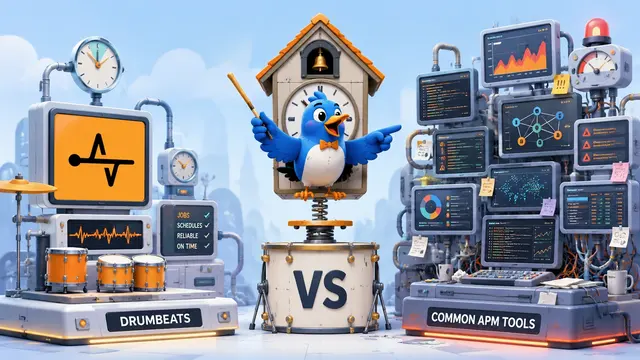
Background Job Monitoring vs APM: What Most Teams Actually Need
Teams searching for APM tools to monitor background jobs and async workers are usually shopping in the wrong category. APM traces why code is slow; job monitoring confirms your crons, queues, and workers ran at all. We compare the two honestly: what Datadog, New Relic, and Sentry are genuinely great at, what a heartbeat monitor does instead, and the real June 2026 cost math for a 50-job workload on each path.
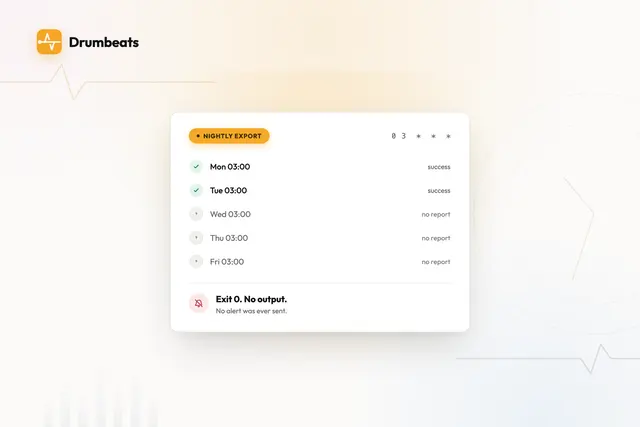
Why We Built Drumbeats for Cron Job Monitoring
We built Drumbeats because too many cron monitoring tools still optimize for dashboards and pricing tricks instead of fast setup, clear APIs, and fair usage for real teams.
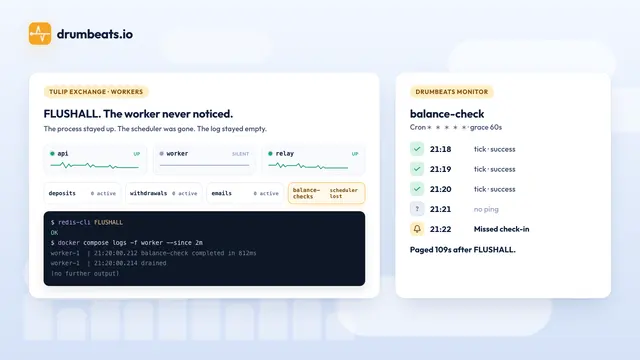
Monitoring BullMQ workers on a toy crypto exchange
I flushed the Redis behind a small exchange's BullMQ queues while the worker was running. It logged nothing, and the minutely balance check stopped. Three Node processes, four queues, an outbox relay, seven Drumbeats monitors created from one prompt, and four timed drills on BullMQ 6.4.2.