
Quickstart
Go from nothing to a monitor that pages you, in about five minutes, ending with a failure you trigger yourself to prove it works.
Here is the finished result. Two lines around the job you already run:
API="https://api.drumbeats.io/v1/ping/<monitor-id>"

curl -sf "$API/start"
/usr/bin/backup.sh && EVENT=success || EVENT=failure
curl -sf "$API/$EVENT"API="https://api.drumbeats.io/v1/ping/<monitor-id>"
curl -sf "$API/start"
/usr/bin/backup.sh && EVENT=success || EVENT=failure
curl -sf "$API/$EVENT"The five steps below get you the <monitor-id>, a channel to alert, and a tested round-trip. Budget five minutes.
Step 1: Create the monitor#
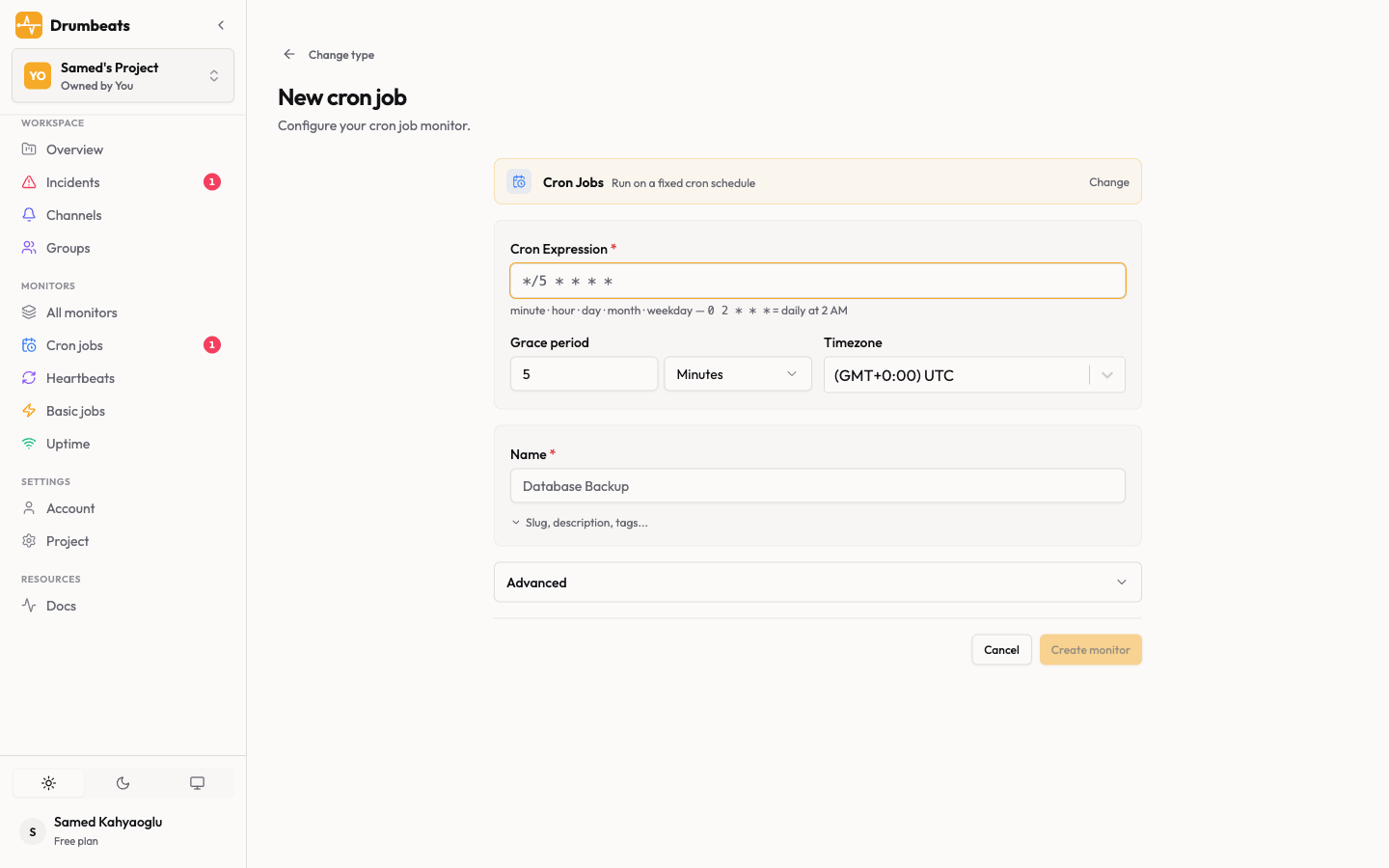
Open the dashboard and click New Monitor. Pick the type that matches the work:
| Type | Use it for | Needs |
|---|---|---|
| Cron | Jobs on a fixed schedule, such as 0 2 * nightly backups | A cron expression and a timezone |
| Heartbeat | Worker loops that tick every N minutes | An interval such as 5m |
| Event-driven | Queue workers, webhook handlers, one-off scripts | Nothing. It reacts to the runs you report |
| Uptime | Public HTTP endpoints. Drumbeats polls these, you send no pings | A URL and a check interval |
Name the monitor, set the schedule and grace period, then save.
Step 2: Copy the ping URL#
Open the monitor and copy the ping URL from the URLs panel:
https://api.drumbeats.io/v1/ping/<your-monitor-id>https://api.drumbeats.io/v1/ping/<your-monitor-id>Copy it rather than retyping. A single wrong character in the UUID sends your pings into a 404 and the monitor stays silent until it misses.
That URL is the credential. There is no API key on the ping path, so anyone holding the URL can ping the monitor. Treat it like a secret and keep it in your environment config, not in a public repo.
Step 3: Ping from your job#
Send start when the job begins and success or failure when it ends. Drumbeats pairs the two using run_id, any string that is unique per execution, and stores both on one run record.
RUN_ID="job-$(date +%s)"
API="https://api.drumbeats.io/v1/ping/<monitor-id>"

curl -sf "$API/start?run_id=$RUN_ID"

if /usr/bin/backup.sh; then
  curl -sf "$API/success?run_id=$RUN_ID"
else
  curl -sf "$API/failure?run_id=$RUN_ID"
fiRUN_ID="job-$(date +%s)"
API="https://api.drumbeats.io/v1/ping/<monitor-id>"
curl -sf "$API/start?run_id=$RUN_ID"
if /usr/bin/backup.sh; then
curl -sf "$API/success?run_id=$RUN_ID"
else
curl -sf "$API/failure?run_id=$RUN_ID"
fiimport uuid, requests
API = "https://api.drumbeats.io/v1/ping/<monitor-id>"
run_id = f"job-{uuid.uuid4()}"
requests.get(f"{API}/start", params={"run_id": run_id}, timeout=5)
try:
run_my_job()
requests.get(f"{API}/success", params={"run_id": run_id}, timeout=5)
except Exception as exc:
requests.post(
f"{API}/failure",
params={"run_id": run_id},
json={"payload": str(exc)},
timeout=5,
)
raiseimport uuid, requests
API = "https://api.drumbeats.io/v1/ping/<monitor-id>"
run_id = f"job-{uuid.uuid4()}"
requests.get(f"{API}/start", params={"run_id": run_id}, timeout=5)
try:
run_my_job()
requests.get(f"{API}/success", params={"run_id": run_id}, timeout=5)
except Exception as exc:
requests.post(
f"{API}/failure",
params={"run_id": run_id},
json={"payload": str(exc)},
timeout=5,
)
raiseimport { randomUUID } from "node:crypto";
const API = "https://api.drumbeats.io/v1/ping/<monitor-id>";
const runId = `job-${randomUUID()}`;
await fetch(`${API}/start?run_id=${runId}`);
try {
await runMyJob();
await fetch(`${API}/success?run_id=${runId}`);
} catch (err) {
await fetch(`${API}/failure?run_id=${runId}`, {
method: "POST",
headers: { "Content-Type": "application/json" },
body: JSON.stringify({ payload: String(err) }),
});
throw err;
}import { randomUUID } from "node:crypto";
const API = "https://api.drumbeats.io/v1/ping/<monitor-id>";
const runId = `job-${randomUUID()}`;
await fetch(`${API}/start?run_id=${runId}`);
try {
await runMyJob();
await fetch(`${API}/success?run_id=${runId}`);
} catch (err) {
await fetch(`${API}/failure?run_id=${runId}`, {
method: "POST",
headers: { "Content-Type": "application/json" },
body: JSON.stringify({ payload: String(err) }),
});
throw err;
}The ping API takes both GET and POST. Use POST when you want to attach a payload such as an error message or the tail of stdout. See payloads.
Step 4: Route the alert to a channel#
A monitor with no notification group cannot page anyone. Three parts, in order:
- Open Settings → Notification Channels and connect one channel. Email, Slack, Microsoft Teams, Telegram, Discord, PagerDuty, or a webhook. Browser push is a per-device toggle on the same screen.
- Open Notification Groups, create a group, and add the channel. One group can hold several channels of different types. They all fire in parallel.
- Open the monitor's Notifications tab and assign the group.
Per-channel setup lives in notification channels. The thresholds that decide when a failure actually pages you live in alert logic.
Step 5: Break it on purpose#
Do not wait for a real outage to find out the wiring is wrong. Fire a failure by hand:
The alert should reach your channel within seconds. It names the monitor, the incident event, and links to the incident. Now resolve it:
You should get a recovery message carrying the outage duration, and the monitor should read UP again.
If no alert arrived#
Work down this list in order. Each step rules out one layer.
| Check | What it tells you |
|---|---|
| The monitor's Incidents tab shows the incident | The ping landed. The problem is delivery, not wiring |
| The Test button on the channel delivers | The channel is healthy. The problem is the group assignment |
| The group is assigned on the monitor's Notifications tab | A monitor with no group never pages |
| For email, the recipient confirmed the verification mail | Unverified external addresses are skipped |
| For browser push, both browser and OS permission are granted | Push needs both, and Do Not Disturb suppresses it entirely |
Browser push has its own failure modes. Push troubleshooting covers all of them.
Next#
Pick the right monitor type for each job in monitor types, then harden the wiring with retries and timeouts in production hardening. Beats and usage explains what each ping costs.